
For most gamers, the sweet spot for a monitor's refresh rate is unquestionably in the 144Hz to 165Hz range. It's a game-changing leap in smoothness from the old 60Hz standard, but it doesn't require a monster PC to run well. This range simply offers the best bang for your buck.
Finding Your Ideal Gaming Refresh Rate
Choosing the right monitor refresh rate can feel overwhelming, but it really just comes down to matching your hardware and your favorite games to the right screen.
Think of the refresh rate, measured in Hertz (Hz), like a digital flipbook. A 60Hz monitor flips 60 pages per second -it works, but the animation can feel a bit jerky. A 144Hz monitor, on the other hand, flips 144 pages in that same second. The result is a fluid, almost lifelike animation that makes tracking fast-moving targets feel incredibly responsive.
This guide will help you find the perfect refresh rate for your gaming style and budget. We'll start with a quick overview and then dig into why these numbers make such a big difference.
The Sweet Spot and Beyond
The biggest "wow" moment for any gamer comes from the jump from a standard 60Hz office monitor to a 120Hz or 144Hz panel. The improvement in motion clarity and reduced eye strain is instantly noticeable.
While professional esports athletes might chase every last frame with 240Hz or even 360Hz monitors for a tiny competitive edge, 165Hz has really become the new mainstream champion. It strikes a perfect balance between buttery-smooth visuals and reasonable GPU demands, all without emptying your wallet. As outlets like Newegg explain, high refresh rates are quickly becoming the new normal for a reason.
Key Takeaway: The upgrade from 60Hz to 144Hz provides the most dramatic and noticeable performance boost for your money. Higher rates offer diminishing returns unless you're a serious competitive player with a high-end PC to match.
To make things even simpler, we've created a quick guide to help you find the right monitor based on your playstyle.
Quick Guide to Gaming Refresh Rates
Use this table to match your gamer profile to the right refresh rate, common game genres, and typical price you can expect to pay.
| Gamer Profile | Recommended Refresh Rate | Best For These Genres | Typical Price Range |
|---|---|---|---|
| Casual & Budget Gamers | 60Hz – 75Hz | RPGs, Strategy, Story-Driven | $100 – $250 |
| Most PC Gamers | 144Hz – 165Hz | All Genres, especially FPS, Action | $200 – $500 |
| Serious Competitors | 240Hz | Competitive FPS, Battle Royale | $300 – $700 |
| Pro Esports Players | 360Hz+ | Elite-Level Competitive Play | $500 – $1000+ |
This table gives you a solid starting point. Now, let's explore what these numbers actually mean for your gaming experience.
How Refresh Rate Actually Changes Your Game
So, what’s the big deal with "Hertz"? Let's get straight to it. Your monitor's refresh rate, measured in Hertz (Hz), is simply how many times it can draw a new image on the screen every second. A bigger number means a smoother, faster picture.
https://www.youtube.com/embed/LnKGTZiaup0
Here's an easy way to think about it: your graphics card is like an artist, furiously sketching frames. Your monitor is the canvas that displays those sketches. If your artist is pumping out 144 sketches per second (that’s your frame rate), but your canvas can only show 60 of them (a 60Hz refresh rate), you’re literally missing more than half the action.
That disconnect is what makes gameplay feel choppy or out of sync. For that buttery-smooth experience we all chase, the artist and the canvas have to be on the same page.
What Higher Refresh Rates Feel Like in a Real Game
Jumping from a standard 60Hz monitor to something like 144Hz isn't just a minor tweak -it’s a night-and-day difference you can feel instantly. This isn't just about impressive numbers on a box; it's about giving yourself a real competitive edge and pulling you deeper into the game.
Here's what you'll actually notice:
Motion Blur Disappears: Ever whip your mouse around in an FPS and everything turns into a smeary mess? That's motion blur. On a 60Hz screen, fast movements get muddy. A high refresh rate keeps everything crisp, so your crosshair stays sharp and enemies don't just blur into the background.
Your Inputs Feel Instant: Input lag is that tiny, frustrating delay between when you click your mouse and when you see the action on-screen. Higher refresh rates slash that delay, making your character feel directly connected to your hands. No more "I clicked first!" moments.
Tracking Enemies Becomes Effortless: With more images flashing per second, your brain gets way more information to work with. Following a sprinting opponent or controlling a tricky recoil spray becomes second nature because you can see every subtle movement.
This isn't just for esports pros. Anyone playing fast-paced games will find their aim feels more intuitive and hitting those tough shots becomes a whole lot more consistent.
FPS vs. Hz: The Critical Partnership
You have to understand how your GPU's frame rate (Frames Per Second, or FPS) and your monitor's refresh rate (Hz) work together. They're two halves of the same performance whole.
Your FPS is how many frames your PC can create each second. Your refresh rate is the maximum number of frames your monitor can display each second.
The Bottom Line: To get any benefit from a high-refresh-rate monitor, your PC has to push a frame rate that at least matches it. A 240Hz monitor is completely wasted if your game is only running at 60 FPS -it will look and feel exactly like a 60Hz screen.
When your GPU spits out more frames than the monitor can handle, you get an ugly visual glitch called screen tearing. This is where the monitor gets confused and tries to display parts of two different frames at once, creating a "torn" line across the screen. This is exactly why technologies like G-Sync and FreeSync exist -they force your monitor and GPU to sync up perfectly.
And while refresh rate is a huge piece of the puzzle, don't forget about polling rate -how often your mouse reports its position to your PC. To get a full picture of system responsiveness, check out our guide on what is polling rate and see how it works hand-in-hand with your monitor. A truly smooth setup is all about a balanced system.
Why 144Hz Is the Sweet Spot for Most Gamers
If you've only ever played on a standard 60Hz monitor, making the jump to 144Hz is a game-changer. I’m not talking about a small, incremental upgrade -it's a night-and-day difference that completely redefines how you see and feel your games. For almost every PC gamer out there, the 144Hz to 165Hz range is the perfect middle ground where performance, price, and practical horsepower all meet.
Seeing more than double the frames every second gives you the single biggest "wow" factor for your money. Suddenly, motion is crystal clear, your mouse movements feel directly connected to the action, and the game world feels incredibly fluid and responsive. That annoying motion blur that gets you killed? It practically vanishes. This clarity is what lets you track a fast-moving enemy in Apex Legends or snap your crosshair with uncanny precision in Valorant.
Maximum Impact Without Maximum Cost
One of the best things about 144Hz becoming the new standard is how affordable it is to get into. You don't need a monster, bank-breaking PC to actually benefit from it anymore. Today’s mid-range hardware has more than enough muscle to pump out the frame rates needed to make a 144Hz display sing.
Here's why this refresh rate just makes sense for so many builds:
Achievable Frame Rates: A solid mid-tier GPU like an NVIDIA RTX 4060 or an AMD RX 7700 XT can consistently push 144+ FPS in most popular competitive games at 1080p and even 1440p.
Cost-Effective Builds: You can build a well-balanced and seriously capable gaming rig by pairing a good CPU and GPU with a 144Hz monitor, all without having to sell a kidney.
Noticeable Gameplay Advantage: The snappy response time and extra visual information give you a real, tangible edge over anyone still stuck on a 60Hz screen.
This perfect alignment means you can build a powerful, responsive system that makes every game better, whether you’re exploring a massive open world or sweating it out in a competitive shooter.
Key Insight: 144Hz gets you over 90% of the perceptible smoothness of an elite pro-level monitor, but for a fraction of the cost and without needing a supercomputer to run it. It’s the point of maximum gain before diminishing returns really start to kick in.
The Sweet Spot for Popular Resolutions
The 144Hz refresh rate is also incredibly flexible, pairing beautifully with the two most common gaming resolutions: 1080p and 1440p. This gives you the freedom to choose what's more important to you -raw frame rate or stunning visuals.
For competitive players who prioritize speed above all else, a 1080p 144Hz monitor is a fantastic choice. It allows even modest gaming PCs to easily hit and maintain that crucial 144 FPS target, ensuring the smoothest experience possible.
On the other hand, the 1440p 144Hz combo has become the go-to for gamers who want the best of both worlds. It’s a huge leap in sharpness and detail from 1080p, but it doesn't require an absolute beast of a graphics card to drive high frame rates. If you’re curious about this popular setup, our guide on the best 1440p gaming monitors can help you find the right fit. It’s the perfect resolution for a premium, crisp visual experience without the punishing GPU demands of 4K gaming.
When to Choose 240Hz for a Competitive Edge
This is where we enter the esports arena. While 144Hz is a huge upgrade for most people, competitive gaming is a different beast entirely. It’s here that 240Hz monitors step into the ring, where the goal isn't just a smooth experience -it's about squeezing out every last micro-advantage.
If your main drive is climbing the ladder in twitchy shooters like Counter-Strike 2, Valorant, or Apex Legends, then a 240Hz display is less of a luxury and more of a strategic investment. The visual jump from 144Hz to 240Hz isn't nearly as jaw-dropping as the leap from 60Hz, but that's not the point. The benefits here are measured in pure performance.
Shaving Milliseconds for Victory
At the top tiers of play, a single millisecond is the difference between winning a duel and getting sent back to the respawn screen. Think about it this way: a 240Hz monitor draws a fresh image every 4.17 milliseconds. A 144Hz panel takes 6.94 milliseconds. That's not just a spec sheet number; it's a real, tangible advantage in the game.
This lightning-fast update cycle gives you two critical edges:
Lower System Latency: A 240Hz monitor shows you what your GPU is rendering much sooner, which helps trim down your overall system input lag. Your mouse click becomes an on-screen action just a fraction of a second faster.
Better Target Clarity: When you're snapping your mouse for a flick shot or trying to track an enemy who's strafing like a maniac, a 240Hz display gives you more visual information. The enemy model stays clearer and less blurry, making them a whole lot easier to hit.
For a serious competitive player, these tiny gains add up. You get clearer targets and faster feedback, which leads to more consistent aim and quicker reactions. A casual gamer might not even notice it, but for someone grinding ranked matches day in and day out, it feels indispensable.
The Hardware Demands of Elite Performance
Here's the catch: to actually get the benefit of a 240Hz monitor, your PC needs to be an absolute beast. It has to consistently pump out 240 frames per second (or more). If your GPU is struggling to hit 150 FPS, your shiny new 240Hz monitor is basically just a 150Hz monitor. You've paid a premium for potential you can't even use.
This is where the total cost becomes a major factor. To reliably hold those frame rates, especially at 1080p or 1440p, you need some serious hardware under the hood.
The Power Requirement: To get the most out of a 240Hz display, you're looking at high-end graphics cards like an NVIDIA GeForce RTX 4070 Ti or an AMD Radeon RX 7900 XT -or something even beefier. You'll also need a modern CPU that won't bottleneck your GPU and choke your frame rate.
Without that kind of firepower, you're just not going to see the frames you need to make the monitor worthwhile. This really positions 240Hz as a choice for gamers who are committed to building a complete, no-compromise competitive rig.
Is 240Hz the Right Choice for You?
So, should you get a 240Hz monitor? It all boils down to your priorities and your budget. If you live and breathe competitive FPS games, the data is on your side. Studies have shown that the jump from 144Hz to 240Hz can cut input lag by another 4-6 milliseconds -a lifetime in a high-stakes firefight. It's no wonder that around 70% of professional esports monitors are 240Hz or higher.
To strike a balance, many competitive players run their 240Hz monitor at 1080p or 1440p. This is a smart move that lets them hit those insane frame rates without needing a PC that costs as much as a used car. The goal is practical performance, not just chasing specs. And for those at the absolute bleeding edge, new QD-OLED panels like the MSI MPG 271QRX are pushing to 360Hz with a mind-boggling 0.03ms response time -what some experts call "frighteningly fast." You can explore more about these high-performance monitors on PC Gamer.
Ultimately, just ask yourself these questions:
Do I spend most of my time in competitive, fast-paced shooters?
Is gaining a small but measurable performance edge my absolute top priority?
Can my PC (or my upgrade budget) handle extremely high frame rates?
If you're nodding your head "yes" to all three, then a 240Hz monitor is a powerful weapon to add to your arsenal. For everyone else, the 144Hz to 165Hz range is still the undisputed king of the hill for value and all-around performance.
What's Next? A Look at 480Hz and Beyond
While 240Hz is the gold standard for most competitive gamers right now, the industry is already sprinting ahead. We're starting to see monitors hit the market with absolutely staggering numbers like 480Hz, 500Hz, and there's even chatter about experimental 1000Hz displays. Let's be clear: this isn't a practical recommendation for today's gamer, but it's a fascinating look at where professional esports hardware is headed.
This is the absolute bleeding edge of display tech. It’s a realm where elite teams and pro players hunt for every possible micro-advantage, and where a few milliseconds can mean the difference between winning and losing a championship. For them, these ultra-fast displays are the next frontier. For everyone else, this is where we run headfirst into the law of diminishing returns.
Hitting the Point of Diminishing Returns
Think back to the first time you saw a 144Hz monitor after using 60Hz your whole life. The difference was huge, right? Unforgettable, even. Moving from 144Hz to 240Hz is a smaller jump, but a trained eye can definitely spot the improvement in smoothness.
But what about going from 240Hz to 480Hz? Here, the difference becomes almost imperceptible to the human eye. It's a bit like adding more blades to a fan. Going from three blades to five makes a noticeable difference in airflow. But going from twenty blades to twenty-two? You'd be hard-pressed to feel any change at all. That's the reality with these ultra-high refresh rates -you're paying a massive premium for an upgrade that most people will never actually see or feel.
Key Takeaway: The visual and performance gains get exponentially smaller as you climb past 240Hz. A 480Hz monitor is technically better than a 240Hz one, but the real-world benefit is a tiny fraction of what you gain by upgrading from 60Hz to 144Hz.
This is why these futuristic panels are more of a tech demo than a sensible purchase for the vast majority of players, from streamers to serious competitors. The money you'd need to spend on both the monitor and the god-tier PC required to even attempt to run it is astronomical.
Pushing the Boundaries of Display Tech
So why do companies keep pushing the envelope? Because this relentless innovation is what makes today's high-end tech become tomorrow's affordable standard. The research happening now paves the way for the monitors we'll all be using in a few years.
And the pace is incredible. Manufacturers are constantly showing off panels that shatter previous records. We're seeing some truly wild stuff coming out:
ASUS ROG Swift Pro: A monitor built from the ground up for esports, pushing refresh rates to their limits.
BenQ Zowie: A legendary name in the competitive scene that continues to fine-tune its displays for maximum speed.
ASUS ROG Strix OLED: An incredibly clever dual-mode monitor that can run at 4K/240Hz for stunning visuals or be switched to 1080p/480Hz for pure competitive performance.
Even with these new options, the numbers don't lie. Industry data shows that around 70% of competitive players are still on 240Hz or 360Hz monitors. This just reinforces the idea that for human perception, the real-world advantages start to plateau.
You can read more about these cutting-edge displays and their place in the market if you're curious. For now, the sweet spot remains in the more accessible refresh rate tiers, but it's undeniably exciting to watch what the future holds.
Matching Your PC to the Right Refresh Rate
Picking the right monitor isn't just about grabbing the one with the biggest number on the box. It's about building a balanced gaming rig where your PC and display work in harmony. Think of it this way: a 240Hz monitor hooked up to a PC that can only push 60 frames per second (FPS) is like putting high-performance racing tires on a family sedan. You've paid for potential you'll never use.
So, how do you find that perfect match? It boils down to a few key questions about the games you play, the horsepower under your PC's hood, and your budget. Let's make sure your next upgrade is a smart one.
The world of monitor tech is always moving forward. Today's high-end is tomorrow's baseline.
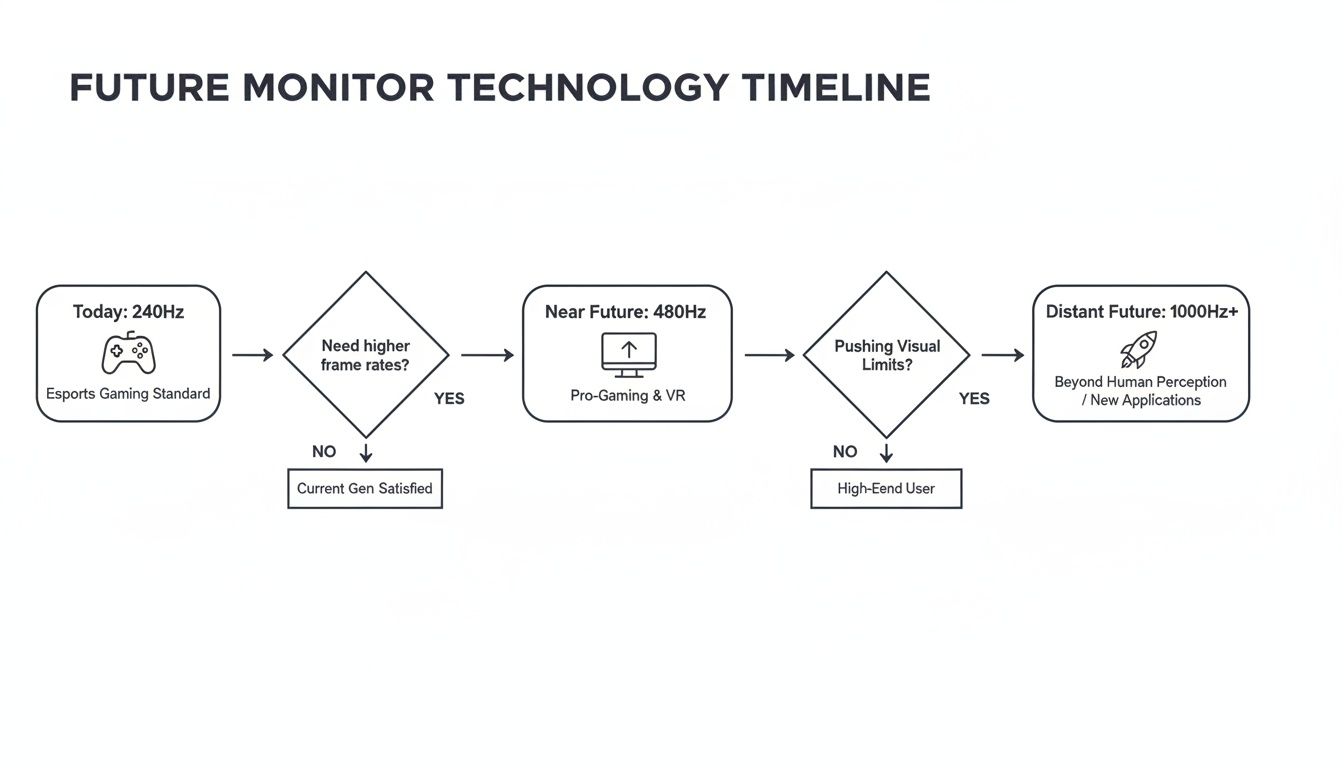
As you can see, the 240Hz standard for competitive play is just one stop on a long road, with 480Hz already on the horizon and even 1000Hz being explored for the distant future.
Aligning Your GPU With Your Gaming Goals
Your Graphics Processing Unit (GPU) is the engine of your gaming experience. It’s responsible for generating every single frame that appears on your screen. A beast of a GPU can churn out high frame rates with ease, making a high-refresh-rate monitor a fantastic investment. On the other hand, a mid-range or budget card will struggle to keep up, creating a performance bottleneck.
The golden rule is pretty simple:
Your in-game frame rate (FPS) should consistently match or exceed your monitor's refresh rate (Hz).
If your PC can only manage to output 100 FPS in your favorite shooter, a 240Hz monitor will feel no smoother than a 120Hz one. You're just not feeding it enough frames to see the difference.
GPU and Refresh Rate Pairing Guide for 1440p Gaming
To give you a practical starting point, we've put together a quick guide. This table matches popular graphics cards with the refresh rates they can realistically drive in demanding games at 1440p -a resolution many gamers consider the sweet spot for visual quality and performance. Remember, these are general guidelines; your actual mileage will vary based on game settings and optimization.
| Graphics Card (GPU) | Target Frame Rate | Recommended Refresh Rate | Ideal Game Genres |
|---|---|---|---|
| NVIDIA RTX 3060/4060 | 60 – 100 FPS | 75Hz – 120Hz | RPGs, Action-Adventure, AAA Titles |
| AMD RX 7700 XT | 100 – 144 FPS | 144Hz – 165Hz | All Genres, FPS, Battle Royale |
| NVIDIA RTX 4070 Super | 144 – 200+ FPS | 165Hz – 240Hz | Competitive Shooters, Esports |
| AMD RX 7900 XT | 165 – 240+ FPS | 240Hz | Elite Competitive Gaming |
This should help you zero in on a sensible pairing. For a deeper dive into specific models and all their specs, our comprehensive gaming monitor database is the perfect tool for comparing your options side-by-side.
The Essential Role of Adaptive Sync
Even with a perfectly matched system, your frame rate is never truly static. It dips and spikes depending on what's happening on screen. An intense firefight might drop your FPS well below your monitor's maximum refresh rate. This mismatch between frames rendered and frames displayed causes a distracting visual artifact called screen tearing. It's ugly, and it completely shatters the illusion of smooth gameplay.
This is exactly why adaptive sync technology is a must-have feature for any gaming monitor today.
NVIDIA G-Sync: The proprietary solution for PCs running NVIDIA graphics cards.
AMD FreeSync: An open standard that works with AMD GPUs and is now widely compatible with modern NVIDIA cards as well.
Both technologies accomplish the same critical task: they force your monitor to sync its refresh cycle to your GPU's frame output in real-time. If your game drops from 144 FPS to a momentary 110 FPS, your monitor instantly adjusts its refresh rate down to 110Hz to match.
The result? A consistently smooth, tear-free picture, no matter how much your frame rate bounces around. It’s the final piece of the puzzle, ensuring all your hardware works together to deliver the fluid experience you paid for.
Common Questions About Refresh Rate
Jumping into the world of high-refresh-rate monitors can feel a bit overwhelming. Let's tackle some of the most common questions that pop up so you can make your choice with confidence.
Can You Really Tell the Difference Between 144Hz and 165Hz?
Honestly, for most people, the jump from 144Hz to 165Hz is incredibly subtle. It's nothing like the night-and-day difference you feel when you first move from 60Hz to 144Hz.
Sure, it's technically smoother, but picking out those extra 21 frames per second in the middle of a chaotic firefight is a real challenge. The good news? Many 165Hz monitors are now priced exactly the same as their 144Hz counterparts, effectively making them the new standard. If the prices are close, go for it -but don't pay a big premium for it.
How Much Does the CPU Matter for Refresh Rate?
It matters a lot. Think of it this way: your GPU is the artist drawing each frame, but your CPU is the director telling the artist what to draw. At extremely high refresh rates (240Hz and beyond), especially at 1080p, the CPU's role becomes critical.
If your processor can't feed the GPU instructions fast enough, your fancy graphics card just sits there waiting. This creates a CPU bottleneck, preventing you from hitting the sky-high framerates your monitor was built for. For high-refresh-rate gaming, a powerful, modern CPU is just as important as the GPU.
Key Insight: Your GPU draws the picture, but your CPU tells it what to draw. For ultra-high refresh rates, both need to be fast to avoid one holding the other back.
Is G-Sync or FreeSync Necessary for a High Refresh Rate Monitor?
While you can technically live without it, I would never recommend it. Adaptive sync technologies -G-Sync for NVIDIA and FreeSync for AMD -are the magic that makes everything feel buttery smooth.
These features dynamically match your monitor's refresh rate to the framerate your GPU is putting out. This completely eliminates screen tearing and stutter, which are notorious for ruining immersion when your hardware and display aren't perfectly in sync. It's the secret sauce for a truly consistent, smooth gaming experience, especially since holding a perfectly locked framerate is almost impossible.
